Free Content Strategy Template (With a Filled-In Example)
On this page 10 sections
- What is a content strategy template?
- What should a content strategy template include?
- Free content strategy template (copy and paste)
- How do you fill in the template?
- What should you check in each quarterly review?
- How do you adapt the template for your type of business?
- How do you make the template work for AI search?
- What mistakes make a content strategy template useless?
- Frequently asked questions about content strategy templates
- Want a strategy built around your customers' searches?
A content strategy template is a one-page document where you record your goals, audience, topics, formats, owners, publishing schedule and measures in one place. Fill it in once, review it every quarter, and every piece of content you make has a clear reason to exist.
Most templates online are blank grids that leave you staring at empty boxes. This one is different: each section says what to write, shows a filled-in example, and explains the choices behind it. You can copy every table below straight into a spreadsheet or document.
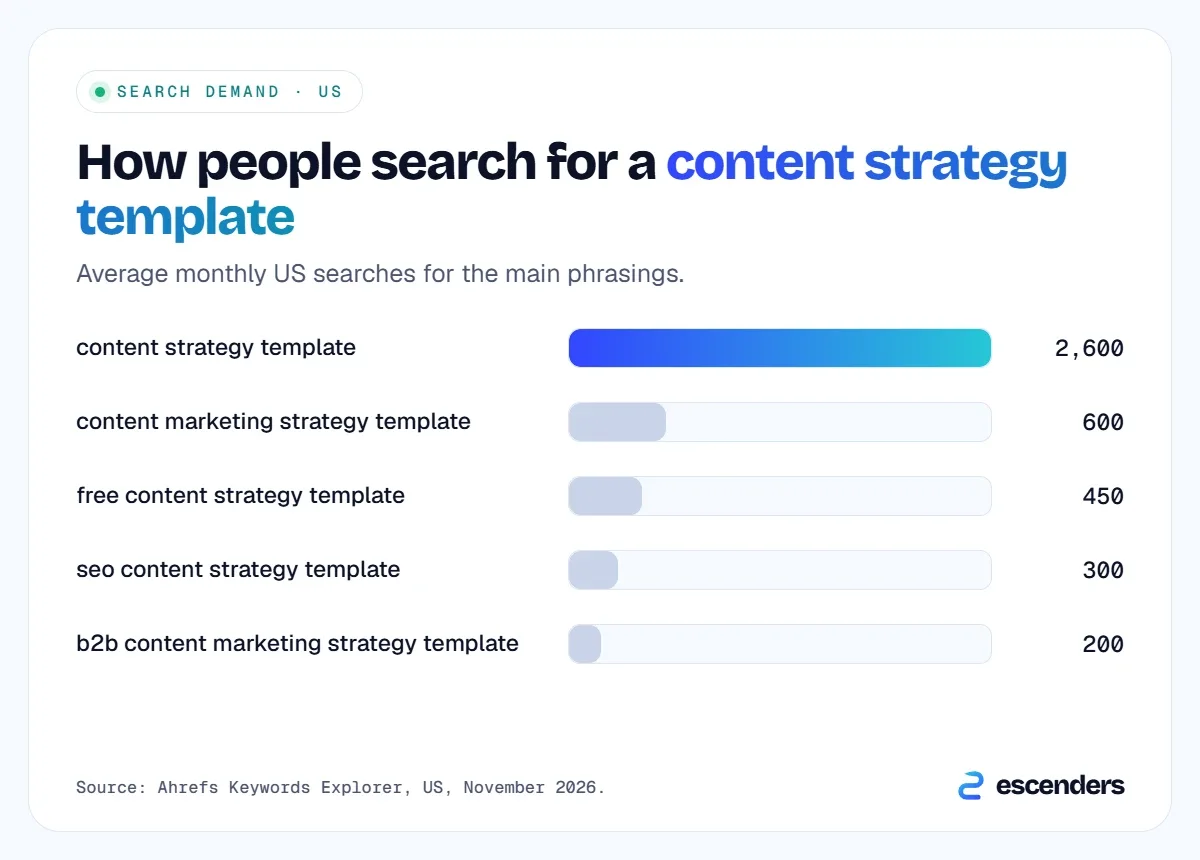
Plenty of people want one. According to Ahrefs, “content strategy template” gets about 2,600 US searches a month, and related phrasings add more.
What is a content strategy template?
A content strategy template is a fill-in-the-blanks framework that turns your business goals into a content plan. It records who you are writing for, what topics you will cover, which formats you will use, who owns each piece, when it ships and how you will judge results. It keeps a team consistent and your effort aimed at what matters.
| Content calendar | Content strategy template | |
|---|---|---|
| Main question | When do we publish what? | Why, for whom and how will we know it worked? |
| Covers goals and audience | No | Yes |
| Covers topics and formats | Only titles and dates | Yes, with intent and owner |
| Covers measurement | Rarely | Yes, one metric per goal |
The calendar is one part of the template, not a replacement for it. If you want the thinking behind each section, read our full guide to building an SEO content strategy.
What should a content strategy template include?
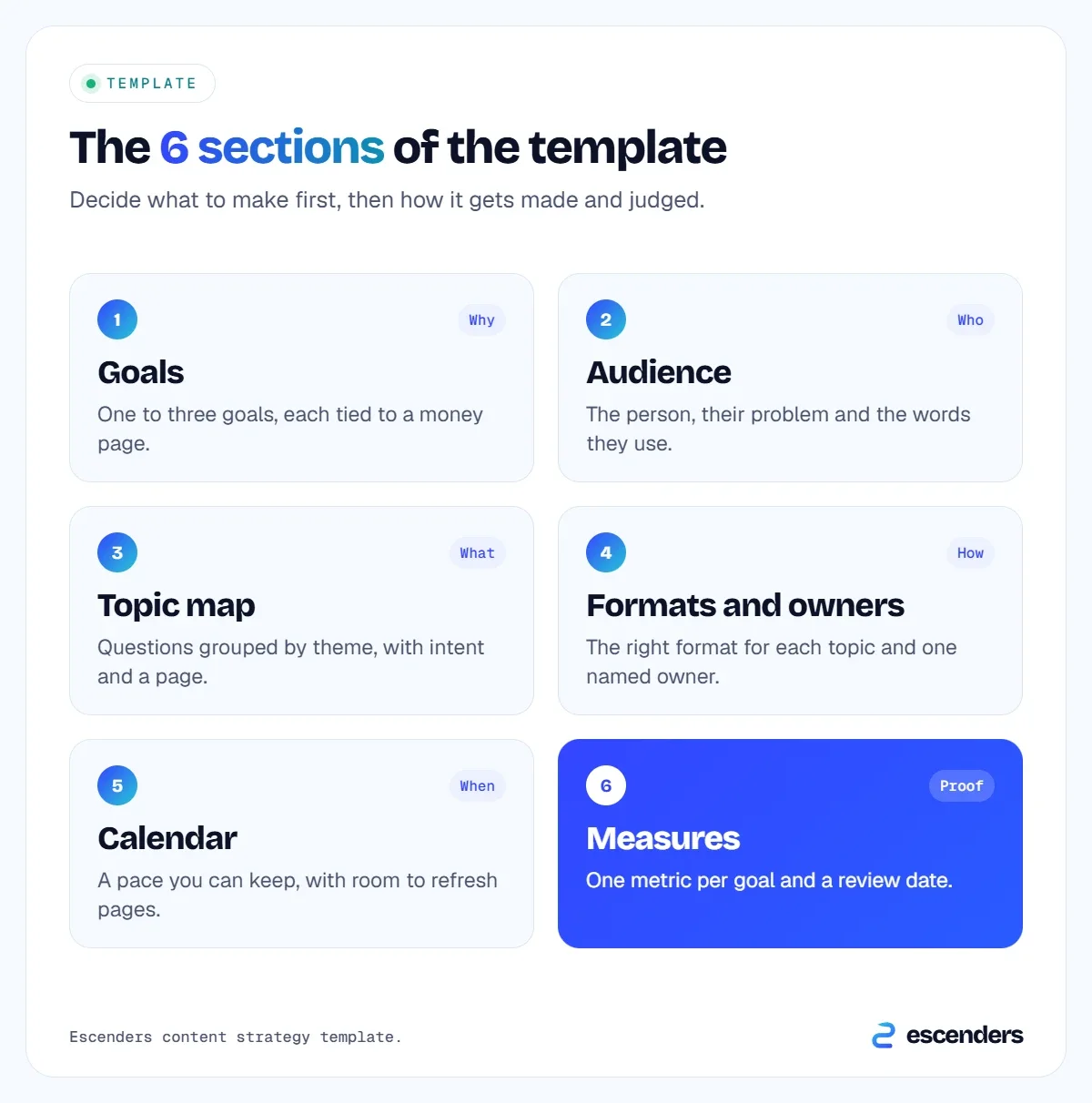
A good template has six sections: goals, audience, topic map, formats and owners, calendar, and measures. Anything beyond that tends to go unused. Keep the whole thing to one page so you actually review it, and write short answers rather than paragraphs.
Free content strategy template (copy and paste)
Copy each table below into a spreadsheet and replace the examples with your own. The examples describe an imaginary local accounting firm, so you can see what a good answer looks like. They are illustrations, not real client data.
1. Goals
Write one to three goals, each tied to a business result and a single number you can track. Link every goal to a page that earns money, such as a service page or the contact form.
| Field | Your answer | Example |
|---|---|---|
| Business goal | More enquiries for tax services | |
| Money page | /tax-services/ | |
| Content job | Answer the questions owners ask before hiring | |
| Metric | Enquiries from organic search |
2. Audience
Describe the person you are writing for, not a demographic. What are they trying to get done, what worries them, and what do they search for? Talk to two or three real customers and use their words.
| Field | Your answer | Example |
|---|---|---|
| Who | Owner of a small shop | |
| Problem | Unsure what they can deduct | |
| Words they use | “tax deductions for small business” |
3. Topic map
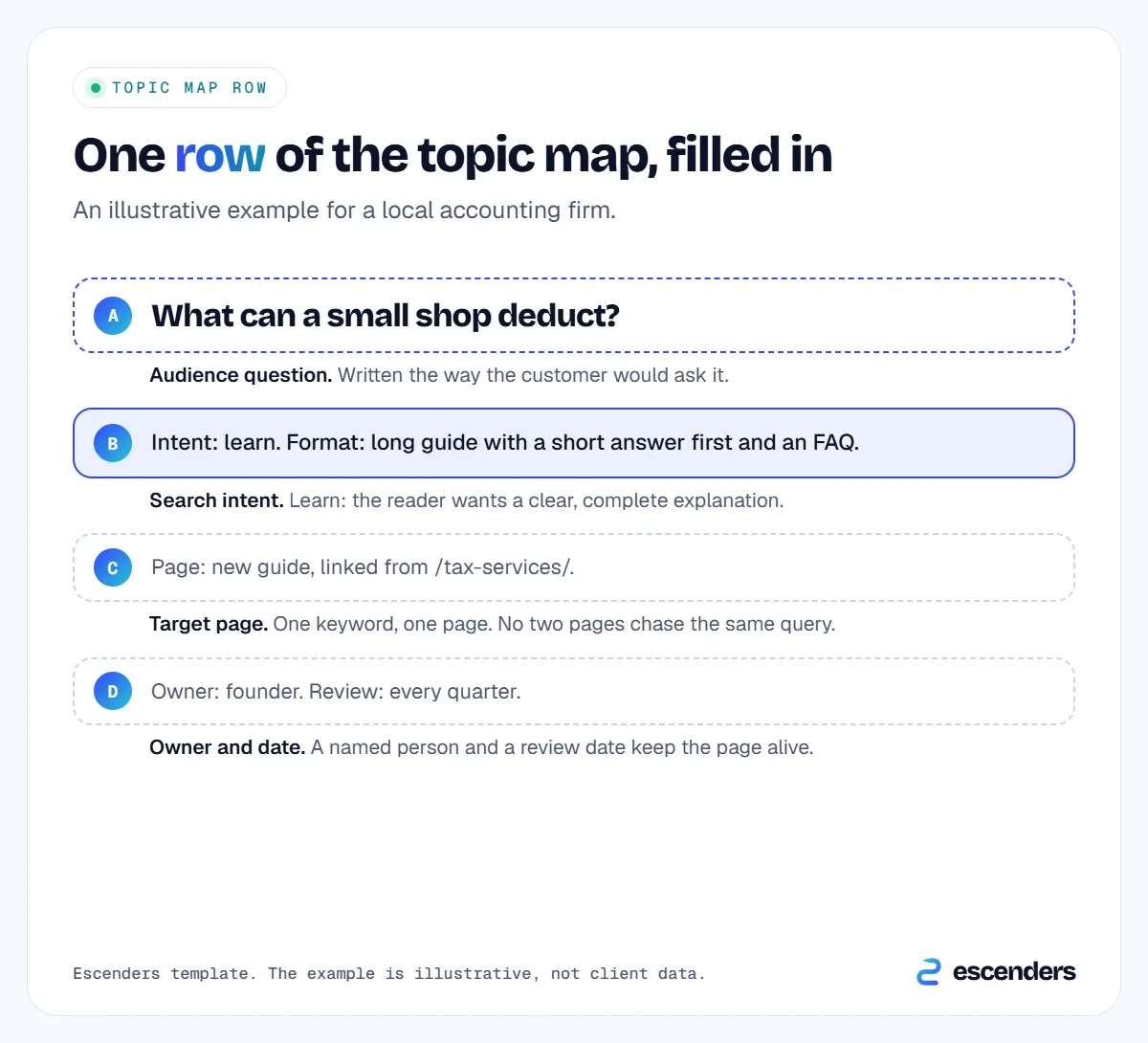
List the questions your audience asks, grouped by theme. For each one, note the search intent and the single page that will answer it. Use a keyword tool to check demand, and choose topics by traffic potential, not just exact volume.
| Topic and question | Intent | Page |
|---|---|---|
| What can a small shop deduct? | Learn | New guide |
| How much does an accountant cost? | Compare | Pricing page |
| Best tax software for a shop | Choose | New comparison |
4. Formats and owners
Match each topic to the format that satisfies the search, and name one person responsible. A page without an owner rarely gets updated.
| Piece | Format | Owner |
|---|---|---|
| Deductions guide | Long guide with FAQ | Founder |
| Cost explainer | Pricing page section | Office manager |
| Software comparison | Table-led article | Freelance writer |
5. Calendar
Set a pace you can keep. One strong page a fortnight beats four rushed ones in week one and nothing after. Leave space to refresh older pages.
| Month | Publish | Refresh |
|---|---|---|
| Month 1 | Deductions guide | Service page |
| Month 2 | Cost explainer | About page |
| Month 3 | Software comparison | Deductions guide |
6. Measures
Decide now what you will look at and when. Review monthly for trends and quarterly for decisions about what to make next.
| Measure | Where to find it | Review |
|---|---|---|
| Impressions and clicks | Search Console | Monthly |
| Enquiries from organic | Analytics or form tool | Monthly |
| Pages needing updates | Your page list | Quarterly |
How do you fill in the template?
Fill it in this order: goals first, then audience, then topics, then everything else. Starting with the calendar is the most common mistake, because you end up choosing topics to fit dates instead of choosing dates to fit the topics your buyers search for.
Work through it in a single sitting, then test it. Ask whether every topic supports a goal, whether each has one page and one owner, and whether you can realistically keep to the calendar. Cut anything that fails. A smaller template that gets used beats a large one that does not.
Search results for this keyword show what people expect. In Ahrefs, the top results include a Canva guide, a Notion template and a LinkedIn article, with an AI Overview and a People also ask box on the page. Most of them are broad. Adding specific, filled-in examples is how a page stands out.
What should you check in each quarterly review?
At each review, check four things: which pages earned impressions and clicks, which topics produced enquiries, which pages have outdated facts, and which new questions customers are asking. Then update the topic map and calendar. The review is what keeps the template alive.
- Results. Compare each goal's metric with the previous quarter and note what changed.
- Winners. Look at the queries that bring impressions to your best pages and write supporting pages for the closest related questions.
- Weak spots. Pages with impressions but few clicks usually need a clearer title and a direct answer at the top. Rewrite those before writing anything new.
- Owners. Confirm every page still has a named owner and a next review date.
Keep a short log of what you changed and why. After two or three quarters, that log becomes the most useful part of your strategy, because it shows which decisions actually moved the numbers for your site rather than for someone else's.
How do you adapt the template for your type of business?
Keep the six sections and change what goes inside them. A service business should centre the template on enquiries, a shop on product and category pages, and a software company on sign-ups. The goal and the money page change; the structure does not.
| Business type | Money page | Topics to start with |
|---|---|---|
| Service firm | Service and contact pages | Cost, process, how to choose |
| Online shop | Category and product pages | Buying guides, comparisons |
| Software or B2B | Demo or trial page | Use cases, alternatives, how-tos |
These starting points are general patterns, not guarantees. Check each against what actually ranks for your market before you commit. For a B2B company, our guide to the content strategy service explains how we adapt the plan.
How do you make the template work for AI search?
Add one column to your topic map for the direct answer, written in 40 to 60 words, and make sure it names the subject so it makes sense when quoted alone. AI tools lift short, clear passages from pages they trust, so writing the answer first helps both Google and chatbots.
Two more habits help. Keep your business facts, such as services, prices and locations, identical everywhere you publish them. And note in the calendar where you will earn mentions on other reputable sites, because AI tools weigh those. Our guides to answer engine optimization and ranking in ChatGPT go into detail.
What mistakes make a content strategy template useless?
A template fails when it is filled in once and forgotten, when it lists topics with no owner, or when it has no link to a business goal. Each of these turns the document into paperwork. Keep it short, assign names and review it on a schedule.
- No goal behind a topic. If you cannot say which money page a piece supports, drop it or rework it.
- Too many sections. Extra fields go empty. Six sections are enough.
- Copying a competitor's topics. Start from your customers' questions, then check what already ranks.
- No review date. Put the next quarterly review in the calendar now.
If you would rather have this done for you, our content strategy service builds the map and our managed content plans cover the writing.
Frequently asked questions about content strategy templates
What is the best content strategy template?
The best template is the one you will keep using. Look for one that ties each topic to a goal, names an owner and sets a review date. It should fit on one page. The six-section version above covers what most small businesses need.
Where can I find a free content strategy template?
You can copy the tables on this page into a spreadsheet or document for free. Many software companies also offer templates, such as Canva and Notion, which appear in Ahrefs' results for this keyword. Pick one, then replace the examples with your own customers' questions.
How is a content strategy different from a content calendar?
A strategy explains why you publish, for whom and how you will measure results. A calendar only lists what goes out and when. You need the strategy first, then the calendar to schedule it.
How often should I update my content strategy?
Review it every quarter and revise it at least once a year. Check which pages earned impressions and enquiries, which topics fell flat, and what questions customers are asking now. Adjust the topic map and calendar to match.
Can I use a content strategy template for SEO?
Yes. Add search intent and keyword data to the topic map, and note the page each query will target. Our guide to SEO content strategy explains how, and the AI search section above shows what to add for chatbots.
Want a strategy built around your customers' searches?
We review your site, find the questions your buyers search for and send a short plan of the pages that would help most. Get my free website & SEO audit, or see our content strategy service if you would like us to build and run it.
Sources: Ahrefs Keywords Explorer, US data (retrieved November 2026). The accounting-firm example is illustrative.

Shoaib Anjum founded Escenders in 2021. He has written and planned content since 2017 for 50+ clients, and now leads the studio's SEO, content strategy and website work.