Generative Engine Optimization Tools: What to Use in 2026
On this page 10 sections
- What do GEO tools actually do?
- How much demand is there for GEO tools?
- Do you need special tools for Google AI Overviews?
- Which free GEO checks should you run first?
- What should a paid GEO tool do?
- Which types of GEO tool are there?
- How do you choose a GEO tool without overpaying?
- What do GEO tools not do?
- Frequently asked questions
- Next step
Generative engine optimization (GEO) tools are software that show whether AI answers mention and cite your brand, which pages they draw from, and what to fix next. The right toolkit is smaller than most vendors suggest: a few free checks and, for most businesses, one paid tracker.
We don't sell a GEO tool, so this guide is vendor-neutral. It explains what the tools really do, which free checks to run first, what to ask before paying for a tracker, and where tools stop being useful. It builds on our complete guide to GEO, so start there if the term is new to you.
What do GEO tools actually do?
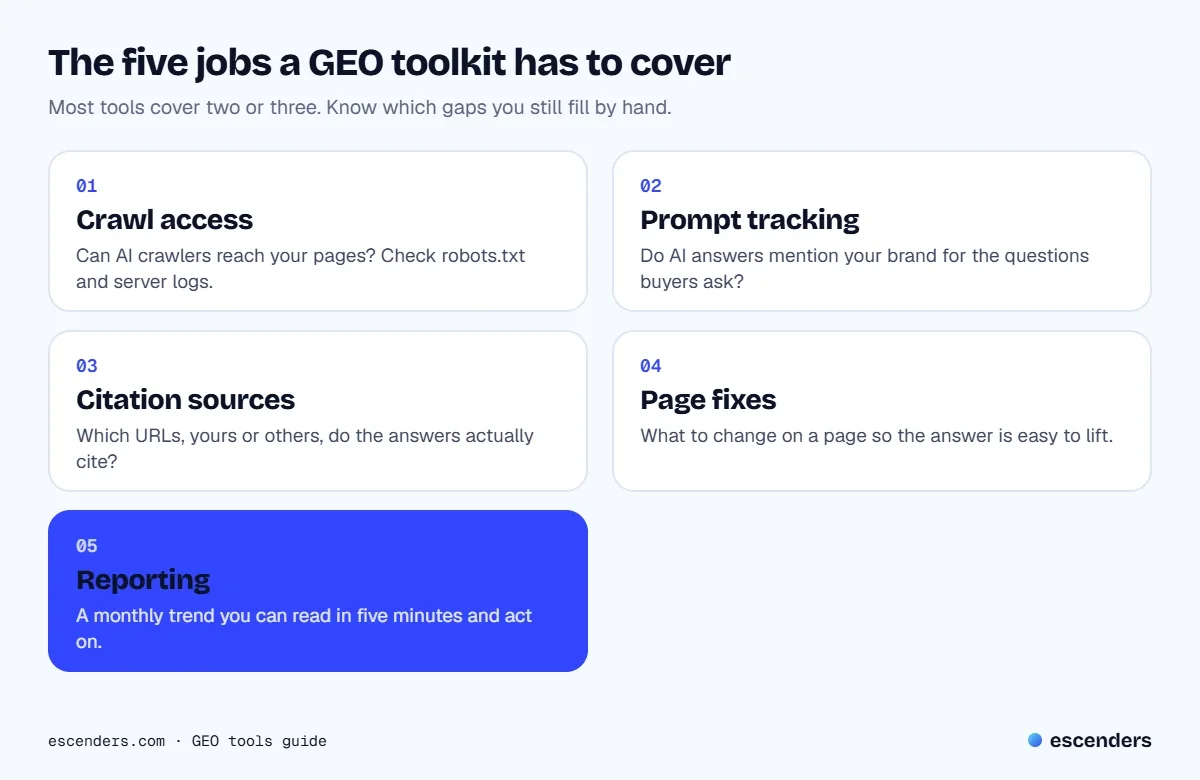
GEO tools measure and improve how often AI answer engines such as ChatGPT, Perplexity, Gemini and Google's AI Overviews name and cite your brand. Most fall into five jobs: checking crawl access, tracking prompts, showing cited sources, suggesting page fixes and reporting trends. Few tools cover all five well.
That split matters because the products on the market lean heavily on one job. A prompt tracker is excellent at telling you that a competitor was named instead of you, and weak at telling you why. A page analyzer can list generic fixes without ever checking what an AI answer cited. Before you compare prices, decide which of the five jobs you need most, and which you can cover by hand.
Notice what is missing from the list: a tool that makes AI engines recommend you. Nothing does. Tools observe and report. The work that changes the result is the same work that has always earned rankings: clear pages, original information, and being easy to quote. If you want the how-to side, read our guides on answer engine optimization and how to rank in ChatGPT.
How much demand is there for GEO tools?
In the United States, "generative engine optimization tools" is searched about 2,100 times a month, according to Ahrefs. Keyword difficulty is 26, which Ahrefs rates as medium, and the top result's traffic potential is about 1,200 visits a month. Cost per click is $15.00, a sign that sellers see buyers in this search.
The wider picture points the same way. The parent topic, "generative engine optimization services", gets about 3,100 US searches a month, and Ahrefs lists 299 keyword ideas that contain the head phrase. Globally the head term draws about 3,000 searches a month, with the United States making up 70 percent of that. The chart below shows the five biggest phrasings.
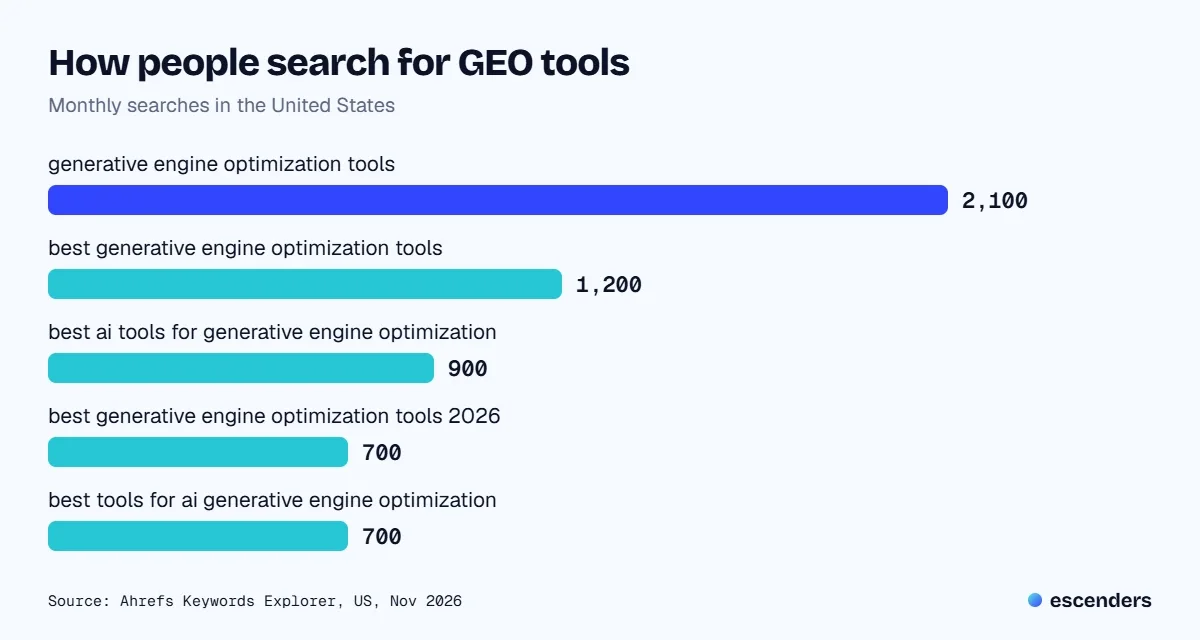
People who search these phrases mostly want a shortlist ("best", "best ai tools for", "2026"). When we looked at the results on 4 November, several of the top listicles were published on the websites of companies that sell the kind of software they rank, alongside Google's own guide, a Wikipedia page and a Reddit thread. A vendor can describe its own product well. It is less likely to tell you that a spreadsheet and an hour a month would do the job for your business, which is the gap this guide fills.
Do you need special tools for Google AI Overviews?
Not to optimize. Google's own guidance says AI features build on its core search systems, treats AEO and GEO as part of SEO, and says you need no special markup or llms.txt file to appear. What you can add is measurement, through Search Console for Google and a tracker for other AI products.
Google's guide asks site owners for the fundamentals: unique, people-first content with a first-hand or expert point of view, clear headings, pages that are indexed and eligible to show a snippet, and a good page experience. It also warns against mass-producing pages for query variations, which can break its scaled content abuse policy. It points to Search Console for measuring how content performs in AI features, and cautions against third-party tools that claim access to Google's internal metrics. No outside tool sees how Google's systems rank anything, so treat any claim to the contrary with suspicion.
Which free GEO checks should you run first?
Run five free checks before buying anything: crawl access in robots.txt, a manual prompt test, Search Console, Bing Webmaster Tools, and your server logs. Together they answer whether AI crawlers can reach you, whether you are named, and whether any AI traffic arrives. Most small sites learn enough from these to decide what to fix.
| Check | Where | What you learn |
|---|---|---|
| Crawl access | robots.txt | Which AI bots are allowed in |
| Prompt test | Each AI assistant | Whether you are named or cited |
| Google data | Search Console | Performance in AI features |
| Bing data | Bing Webmaster Tools | AI citations in Bing and Copilot |
| Bot visits | Server logs | Which AI crawlers fetch pages |
How do you check AI crawler access?
Open your robots.txt and look for the crawlers that feed AI answers. OpenAI documents OAI-SearchBot for ChatGPT search, GPTBot for model training and ChatGPT-User for requests a person makes. Perplexity documents PerplexityBot for search and Perplexity-User for user requests. Allow the search bots if you want citations, and expect up to about 24 hours for changes to apply.
| Crawler | Used for | robots.txt effect |
|---|---|---|
| OAI-SearchBot | ChatGPT search | Blocked sites drop out of answers |
| GPTBot | Model training | Disallow opts out of training |
| ChatGPT-User | User requests | Rules may not apply |
| PerplexityBot | Perplexity search | Allow it to be surfaced |
| Perplexity-User | User requests | Generally ignores robots.txt |
Two practical notes. First, blocking training (GPTBot) and allowing search (OAI-SearchBot) are separate choices, so you can opt out of one without disappearing from the other. Second, a firewall or bot-protection setting can stop a crawler that your robots.txt welcomes. Perplexity's documentation specifically warns that some bot-protection modes cannot be bypassed with custom rules, so check your hosting or CDN settings if a bot you allowed never shows up. Sources: OpenAI crawler overview and Perplexity crawlers.
Can you track AI answers by hand?
Yes, for a small set of questions. Write 10 to 20 real questions your buyers ask, run each in ChatGPT, Perplexity and Gemini once a month, and record whether you are named, which URL is cited and which competitors appear. A spreadsheet with date, platform, question and result is enough to start.
The limit is noise. AI answers can differ from one run to the next, so one check is an observation, not a ranking. Repeat the same questions in a fresh session, keep the wording identical month to month, and look at the trend rather than a single result. When this routine becomes a chore, or you need to cover many questions and several countries, that is the moment a paid tracker earns its fee.
What should a paid GEO tool do?
A paid GEO tool should track a defined set of prompts across the AI platforms you care about, show the exact answers and cited URLs, separate your brand from competitors, and export the raw data. If it only gives a single visibility score, you cannot check its work or act on it.
Those requirements turn into six questions to put to any vendor. Ask them in a demo, and note which answers are vague.
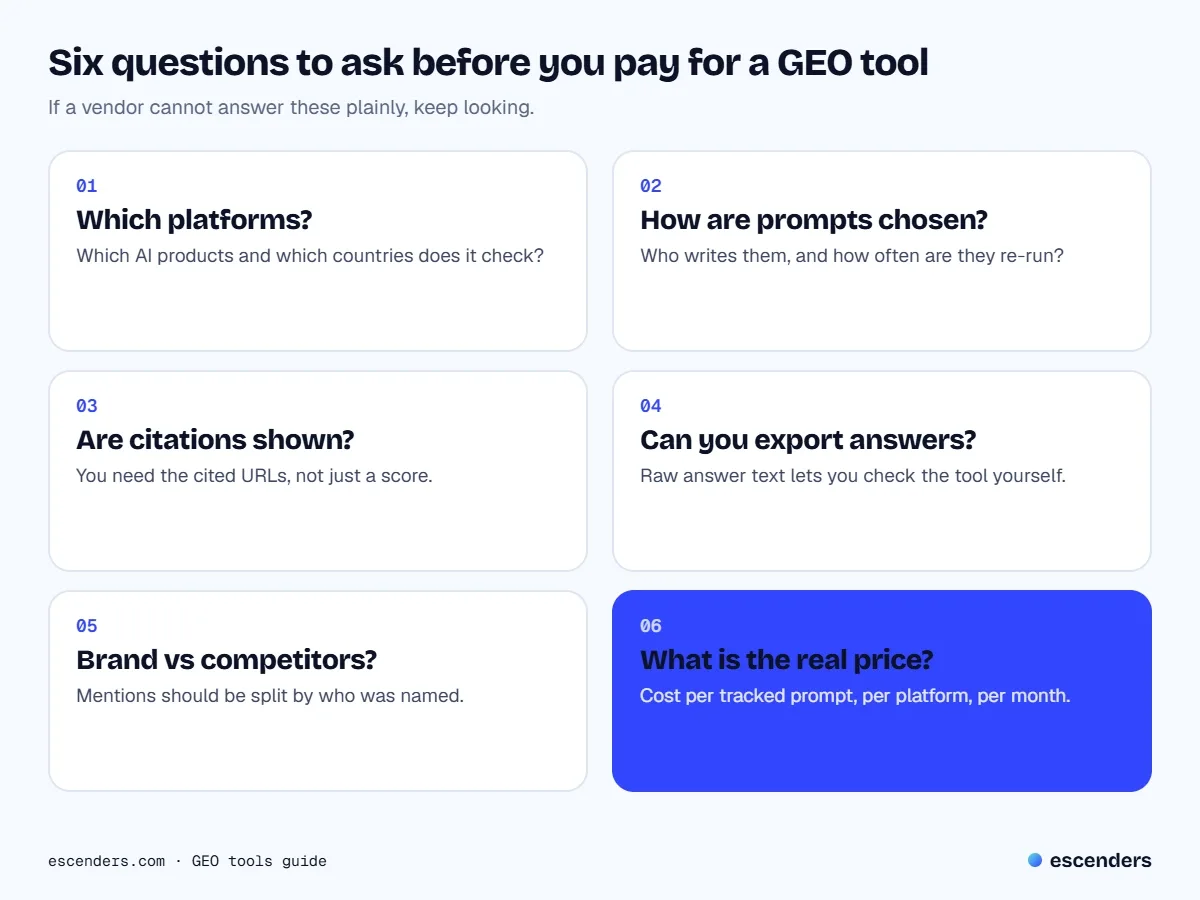
The first two questions protect you from thin coverage. A tool that checks one platform in one country tells you little if your buyers use several. How prompts are chosen matters too: a tool that picks prompts for you may measure what is easy to track rather than what your customers ask. The next two, cited URLs and raw answers, are about trust. If you can read the actual answer, you can spot when a "mention" was a throwaway line or a wrong description of your business.
Which types of GEO tool are there?
There are four main types: prompt trackers, SEO-suite add-ons, citation and page analyzers, and crawl or log analyzers. They overlap, and many products blend two or three. Pick by the job you most need done, not by the longest feature list.
| Type | Best for | Watch out for |
|---|---|---|
| Prompt tracker | Mentions over time | Scores with no cited URLs |
| SEO-suite add-on | Teams already in a suite | Limits on tracked prompts |
| Page analyzer | Fixing specific pages | Generic advice |
| Log analyzer | Technical teams | Needs developer access |
SEO suites have been adding AI visibility features. Ahrefs, which we use for keyword research, offers Brand Radar for following brand mentions and citations in AI answers, for example. If you already pay for a suite, check what its AI add-on covers before adding a second subscription. If you do not, a stand-alone tracker can be cheaper than a full suite.
How do you choose a GEO tool without overpaying?
Start from the problem, not the product. Write down the questions you want answered, run the free checks for a month, and only then trial tools against that list. Pay for coverage you will read every month, and skip dashboards that need a specialist to interpret. Four steps keep the decision honest:
- List your prompts. Choose 10 to 20 questions buyers genuinely ask, in their words, including comparison and "best" questions.
- Run the free checks. Record crawl access, a manual prompt test and your Search Console and Bing data so you have a baseline.
- Trial two tools on the same prompts. Compare their answers with your manual results. If they disagree wildly, find out why before trusting either.
- Pick on cost per useful insight. Compare price per tracked prompt and per platform, and favor monthly plans you can cancel.
If a tool's trial cannot show you the answer text and the cited pages for your own prompts, treat that as a warning sign. Most buying mistakes in this category come from paying for a score that nobody on the team knows how to act on.
What do GEO tools not do?
GEO tools do not create visibility; they report it. The things that move AI answers are on your own site: pages that answer a question directly, original facts or examples, clear authorship, and a site that crawlers can read. A tracker can tell you a gap exists, but a person has to write the page that closes it.
That is also why we caution against anything promising instant AI rankings. Google's own guide lists chunking content into tiny pieces and rewriting pages purely for machines among the tactics to ignore, and it describes plain good SEO as the foundation. If a tool tells you to restructure your whole site around a trick, ask for evidence and test one page first. Our own approach is in the content strategy work we do: decide the questions, write helpful pages, measure, repeat.
Frequently asked questions
What are GEO tools?
GEO tools are software for tracking and improving how AI answer engines mention and cite your brand. They usually check prompts across platforms such as ChatGPT, Perplexity and Gemini, report cited sources and competitors, and sometimes suggest page changes.
Are GEO tools worth paying for?
They can be, once you have a stable list of prompts and outgrow a monthly spreadsheet. For a small site with a handful of key questions, the free checks above often tell you enough. Pay when you need coverage across many prompts, platforms or countries.
Is there a free GEO tool?
There is no single free tool, but you can build a free toolkit: robots.txt review, manual prompt tests, Search Console and Bing Webmaster Tools reports, and your server logs. Several paid products offer trials, which are useful for comparing answers against your manual results.
Do I need an llms.txt file?
For Google Search, no. Google's guide says you do not need new machine-readable files, AI text files or special markup, and that an llms.txt file neither helps nor harms visibility there. Other AI products may treat it differently, so check each product's documentation.
How often should I check AI answers?
Monthly is enough for most businesses. AI answers vary between runs, so keep the same prompts and wording, repeat each check, and read the trend over several months rather than reacting to one result.
Next step
Not sure which of these checks matter for your site? Get our free website & SEO audit and we will show you what to fix first, or see how our SEO services include AI search visibility as part of the plan.

Shoaib Anjum founded Escenders in 2021. He has written and planned content since 2017 for 50+ clients, and now leads the studio's SEO, content strategy and website work.